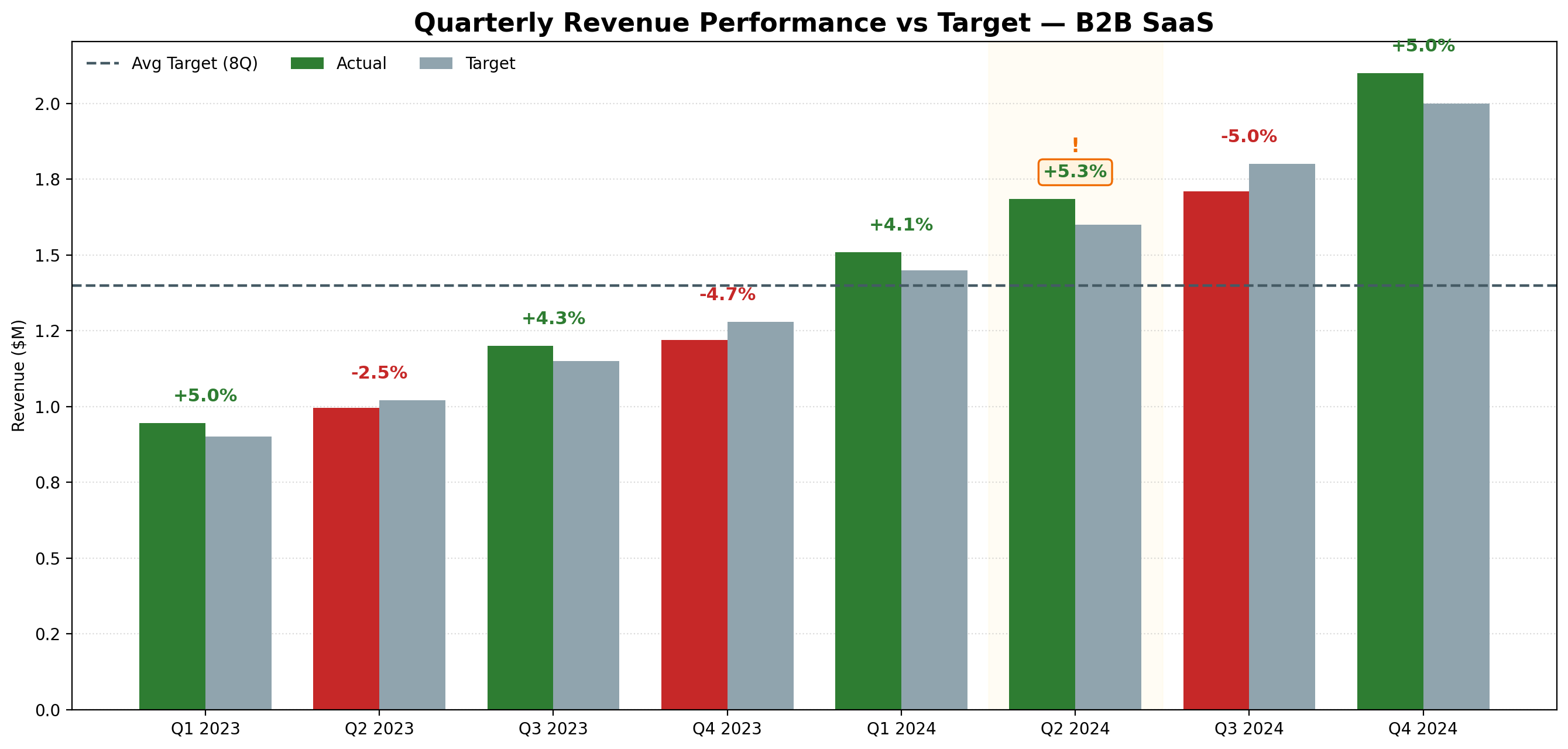
Generated with Julius AI using a plain English prompt. Green = above target, red = below. No formulas, no drag and drop.
Tested by a data analyst with 8 years of experience. No sponsored content.
4/5 — Recommended for data analysts who generate charts regularly
I've been using Julius AI in my workflow for several months. Here's the honest version: what it does well, where it falls short, and exactly who should pay for it.
If you want a fast answer:
For most data analysts, Julius AI saves hours every week by replacing manual work in Excel or Python.
Bottom line upfront: Julius AI is the fastest way to turn raw data into presentation-ready charts without writing code. If that's something you do more than twice a week, the paid plan pays for itself.
Julius AI is a data analysis tool built specifically for analysts, researchers, and anyone who works with data regularly. You upload a file — CSV, Excel, or connect a database — and interact with your data in plain English. No Python, no formulas, no drag-and-drop chart builders.
Behind the scenes, Julius runs a combination of AI models (including GPT-4 and Claude) optimized for data tasks. You don't choose which model runs — it selects automatically based on what you're asking.
| Category | Rating | Notes |
|---|---|---|
| Chart generation | ⭐⭐⭐⭐⭐ | Best in class — fast, clean, exportable |
| Statistical analysis | ⭐⭐⭐⭐ | Solid for most analyst use cases |
| Ease of use | ⭐⭐⭐⭐⭐ | Plain English — no learning curve |
| File handling | ⭐⭐⭐⭐ | Up to 32GB on paid plans |
| Written narrative | ⭐⭐⭐ | Descriptive but not strategic |
| Value for money | ⭐⭐⭐⭐ | Pays for itself quickly if used regularly |
This is Julius AI's strongest feature by a wide margin. You describe the chart you want in plain English, and it generates a clean, presentation-ready output in seconds. No formatting, no axis adjustments, no color picking.
Generated with Julius AI using a plain English prompt. Green = above target, red = below. No formulas, no drag and drop.
The speed difference compared to building charts manually is significant. A chart that would take 15-20 minutes in Excel takes under 30 seconds in Julius AI. Over a week of regular use, that adds up to hours saved.
Julius runs Python in the background — you never see it. This makes it genuinely accessible for analysts who don't code, and faster even for analysts who do. Writing a matplotlib chart from scratch takes time even if you know how.
Julius handles files up to 32GB on paid plans. Most AI tools cap out much lower. For analysts working with large datasets, this is a real differentiator.
Julius will generate commentary on your data — but it describes what the numbers are, not what they mean for the business. If you need an executive summary or a recommendation, Claude handles that better. Use Julius for the charts, Claude for the words.
The free tier is limited on message count. If you use it daily for real work, you'll hit the limit within a week. The paid plan removes this — but it's worth knowing before you start relying on it.
Julius doesn't replace a BI tool like Databox or Tableau. It's for one-off analysis and chart generation — not ongoing dashboards that update automatically. For automated delivery, you still need something like Databox.
| Plan | Price | Best for |
|---|---|---|
| Free | $0 | Testing the tool, occasional use |
| Individual ⭐ | ~$20/month | Solo analysts who generate charts regularly |
| Team | ~$50/month | Teams with shared workspaces and collaboration needs |
Julius AI is a good fit if you:
Julius AI is NOT the right tool if you:
Julius AI does one thing better than any other tool I've tested: it turns raw data into clean charts fast. For that specific job, it's the best option available in 2026.
It's not a complete analytics platform. It won't replace Claude for writing or Databox for automated delivery. But as the chart generation layer of your workflow, nothing is faster or easier.
Try Julius AI free — Generate your first chart in under 60 seconds
🎁 Use code MAY10 for 10% off your first payment.
Yes — Julius AI has a free tier that lets you test the tool without a credit card. The free tier is limited on message count, so for regular daily use you'll want the paid plan at around $20/month. Try Julius AI free
Julius AI accepts CSV, Excel, and can connect to databases. On paid plans it handles files up to 32GB — significantly larger than most AI tools which cap out at 20MB or less.
For chart generation and exploratory analysis — yes, Julius AI is faster and easier than Excel. For complex formula work, pivot tables, or data that needs to stay in spreadsheet format, Excel is still the right tool. Think of Julius AI as a complement, not a replacement.
Julius AI is purpose-built for data — it connects directly to your files and generates charts automatically. ChatGPT can help write code for data analysis but can't generate charts from your actual data directly. For visualization and file-based analysis, Julius AI wins clearly.
Yes, if you generate charts regularly. The Individual plan at ~$20/month saves enough time in the first week to cover the cost. Start with the free tier to confirm it fits your workflow before paying.
Get 5 Free AI Prompts for Data Analysts
Join analysts who save hours every week with AI tools.
What you get:
✓ Copy-paste ready — use today
✓ Works with Julius AI, Claude & ChatGPT
✓ Tested in real analyst workflows
✓ From an analyst with 8 years experience
⭐ Some links may be affiliate links.