Best AI Tools for Data Analysts in 2026 (Honest Review)
I've been a data analyst for 8 years. I've tried most of the AI tools that claim to "transform your workflow." Here's what actually works — and what doesn't.
Claude is my daily driver. What makes it different from other AI tools is how it handles complex data questions. When I paste a SQL query or a messy dataset description, Claude doesn't just give a generic answer — it reasons through the problem.
Best for: Writing data narratives, explaining findings to non-technical stakeholders, reviewing SQL logic.
Weakness: No direct database connection (yet).
Verdict: If you only use one AI tool as a data analyst, make it this one.
Julius AI is built specifically for data analysts. You upload a CSV or connect to a data source, and it runs analysis, creates charts, and explains results in plain English.
I was skeptical at first. Then I uploaded a messy sales dataset and asked it to find anomalies. It found three issues I had missed manually.
Best for: Exploratory data analysis, quick visualizations, non-technical teams that need data answers fast.
Weakness: Still limited on very large datasets.
Verdict: The most underrated AI tool in the data space right now.
ANALYST PROMPT — COPY & PASTE INTO JULIUS AI
TASK: Analyze quarterly revenue performance vs target for a B2B SaaS company
DATA: Connect your CSV or database — columns needed: Quarter, Revenue_Actual, Revenue_Target
OUTPUT: Professional grouped bar chart with variance labels and trend analysis
FLAG: Highlight quarters where actual deviates more than 5% from target
1. DATASET — 8 quarters (Q1 2023–Q4 2024) · Revenue $800K–$2.1M · realistic growth · mix of hits and misses
2. CALCULATION — Variance_Pct per quarter · flag Above/Below Target · full-year totals 2023 vs 2024
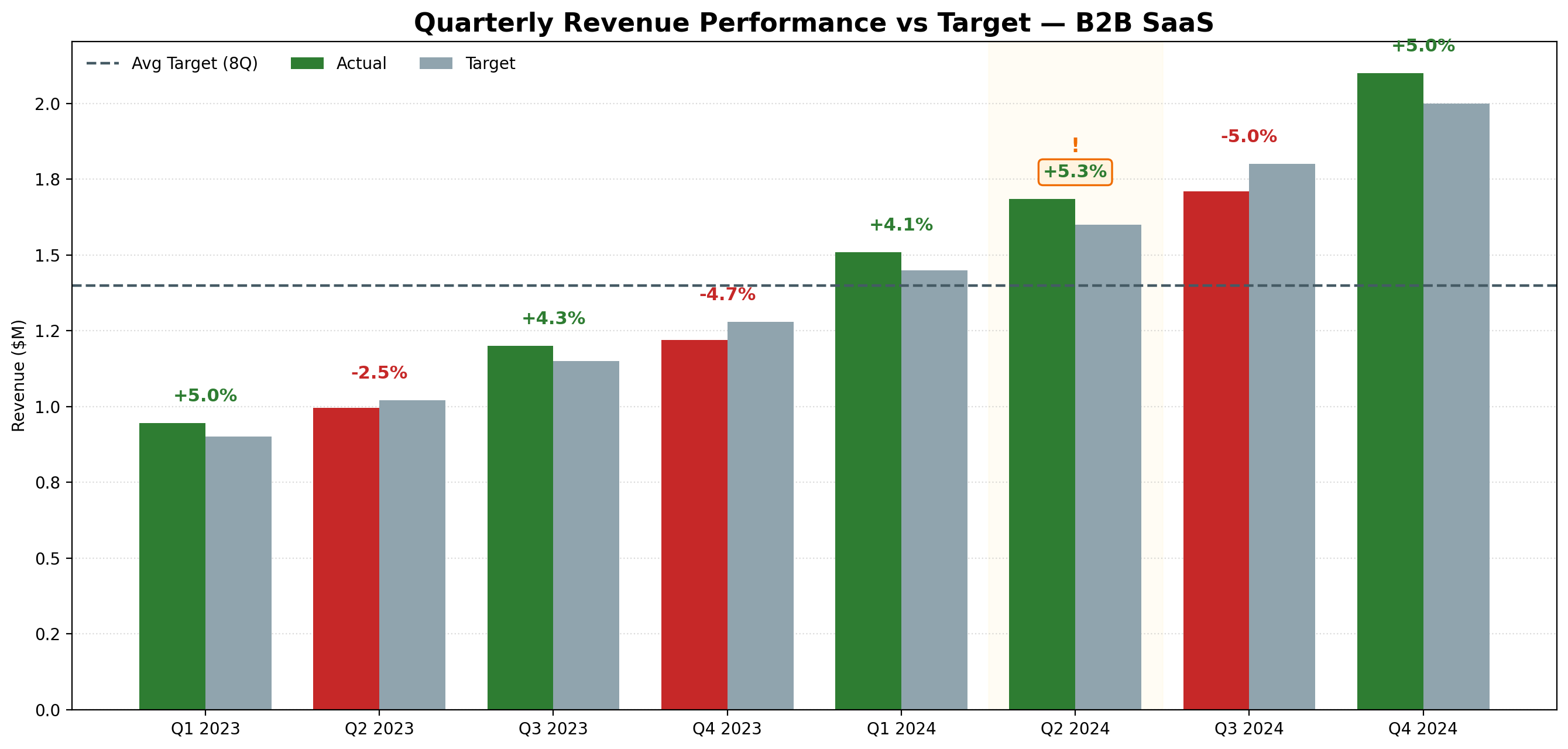
3. VISUALIZATION — Grouped bars (green=above, red=below) · variance % labels · dashed average line · title: "Quarterly Revenue Performance vs Target — B2B SaaS"
4. INSIGHT — Which quarters missed · overall trend · one recommendation · max 3 bullet points
Result: Generated in under 15 seconds — no formulas, no drag and drop.
Julius AI generated this chart from the structured prompt above — green bars indicate quarters above target, red below. Q2 2023 and Q4 2023 missed target, while Q4 2024 was the strongest quarter. No formulas, no drag and drop.
Every data analyst spends hours researching — industry benchmarks, methodology questions, finding datasets. Perplexity replaces most of that Google time.
Unlike ChatGPT, Perplexity cites its sources. For analysts who need to verify information before putting it in a report, this matters.
Best for: Quick research, finding data sources, understanding unfamiliar business domains before a new project.
Weakness: Not built for actual data analysis.
Verdict: I use it before every new project to get up to speed fast.
4. ChatGPT — The All-Rounder
ChatGPT needs no introduction. For data analysts, it's most useful for writing Python or SQL code quickly, explaining statistical concepts, and drafting report templates.
Best for: Code generation, learning new concepts, general productivity.
Weakness: Tends to hallucinate on specific data or numbers. Always verify outputs.
Verdict: Useful, but not specialized enough to be your only tool.
5. GetResponse — Best for Automating Data Reports
This one surprises people. GetResponse is known as an email marketing tool, but data analysts are using it to automate report distribution — scheduled emails with key metrics sent automatically to stakeholders.
Instead of manually sending weekly reports, you set it up once and it runs forever.
Best for: Automating recurring reports, sending dashboards to non-technical stakeholders, building internal data newsletters.
Weakness: Overkill if you only need basic email sending.
Verdict: If your team still gets reports manually, this fixes that.
Julius AI is the best tool specifically built for data analysts. You upload your dataset, describe the chart you want in plain English, and it generates it in seconds — no formulas, no drag and drop. Try Julius AI free — Turn raw data into charts in seconds
ChatGPT can help write SQL and Python code for data analysis, but it cannot directly connect to your database or generate charts from your data. For actual data analysis, Julius AI is the better choice — it connects directly to your data sources.
What AI tools do professional data analysts use in 2026?
Based on my 8 years of experience, the most practical stack is: Claude for writing and reasoning, Julius AI for visualization, Perplexity for research, and GetResponse for automated report delivery. Each tool does one job well — together they cover the full workflow.
Get 5 Free AI Prompts for Data Analysts
Join analysts who save hours every week with AI tools.